
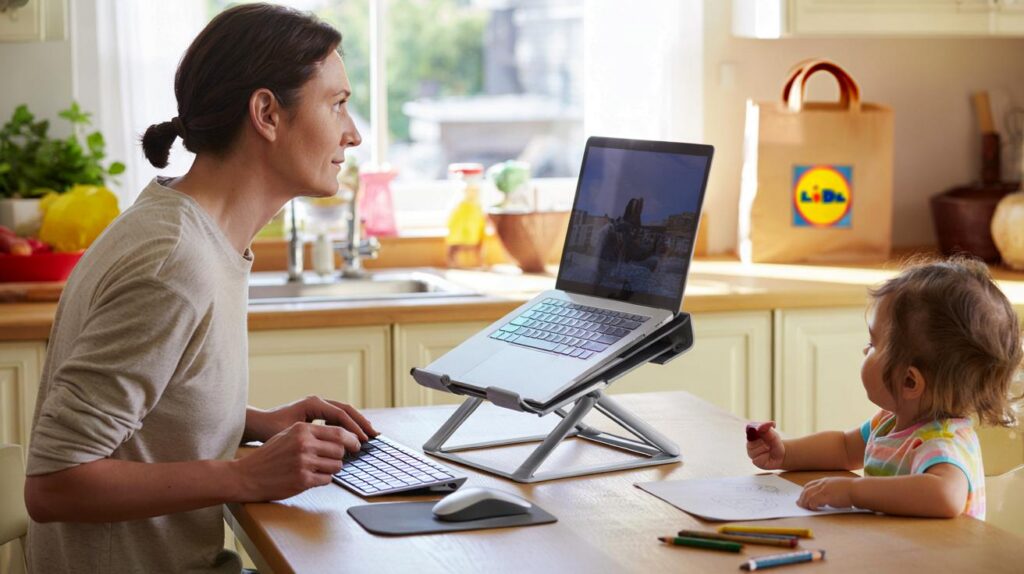
Back ache, cramped desks and kitchen-table shifts drain your energy; a small, cheap tweak could change comfort, focus and mood.
From 17 September 2025, Lidl is selling a Tronic adjustable laptop stand for £3.99, aimed squarely at people juggling remote work and real life. The price is tiny, the impact on posture can be big, and the timing suits the back‑to‑routine push after summer.
What Lidl is putting on shelves
Lidl’s Tronic stand is a compact, adjustable platform for laptops. It raises and tilts your screen so you can sit taller, ease neck strain and type with less tension. The offer landed in UK stores on 17 September at £3.99, a headline price in a category that often costs several times more.
For £3.99, you get an adjustable laptop lift that fits everyday 13–15 inch devices and disappears in a drawer when you’re done.
The Tronic brand sits within Lidl’s own-label electronics. The focus is function over flash: sensible adjustability, a footprint that suits shared spaces, and a design that helps you keep a tidy table between meetings and mealtimes.
The basics you actually need
- Adjustable height and angle to bring the screen closer to eye level.
- Compact build for kitchen tables and narrow desks.
- Compatibility with common 13–15 inch laptops used by students and office workers.
- Quick foldaway so you can reclaim space for family life.
Why adjustability matters when you work from home
Laptop screens sit low. That pulls your head forward and rounds your shoulders. Over hours, that posture loads your neck, upper back and wrists. A stand corrects the angle so your gaze meets the top of the screen, not your lap. That small change encourages you to straighten your spine and relax your shoulders.
Hybrid days often mean unusual set‑ups: the sofa before school run, the breakfast bar at lunch, the quiet corner late at night. Adjustability lets you adapt to each position rather than forcing your body to compromise. When you need to move again, you tweak the angle and keep going.
Set the screen so the top edge sits at or just below eye level, and keep your elbows near 90 degrees with forearms supported.
Pair the stand with a separate keyboard and mouse if you can. That keeps your wrists straight and brings the typing position to a comfortable height while your eyes stay level with the display. If you must type on the laptop itself, use a gentler raise to avoid overextending your wrists.
Parents, students and hybrid workers benefit
Parents who work around naps and homework need a tool that sets up in seconds. Students switching between lectures and library tables want something light and inexpensive. Office staff who split time between home and HQ value a stand that fits a bag and doesn’t scream for attention in a meeting room.
How it stacks up on price
The headline here is cost. Entry‑level metal stands on the high street typically sit in the £15–£30 bracket. Heavier sit‑stand desk converters run far higher. Lidl’s £3.99 pricing makes ergonomic improvement accessible, especially if you need more than one unit for family use.
| Product | Typical UK price |
|---|---|
| Lidl Tronic adjustable laptop stand | £3.99 |
| Generic folding laptop stand (metal) | £15–£25 |
| Premium adjustable stand (brand) | £30–£60 |
| Sit‑stand desk converter | £80–£200+ |
One coffee’s worth of money for a tool you use daily is rare in home‑office gear; that’s the draw here.
You don’t get luxury finishes at this price. You do get function that targets the biggest source of discomfort: screen height and angle. For many, that solves 80 percent of the problem with 20 percent of the spend.
Five‑minute set‑up that protects your neck
Give yourself five minutes to dial in the basics. Small changes add up over a week of work.
- Place the laptop on the stand and sit where you’ll work for the next block of time.
- Raise or tilt the screen so your gaze lands at the top of the display, not the middle.
- Use a separate keyboard and mouse if possible; keep elbows at roughly 90 degrees.
- Sit back so your lower back touches the chair; support it with a small cushion if needed.
- Bring the screen closer to avoid leaning forward; your arms shouldn’t reach.
- Follow the 20‑20‑20 rule: every 20 minutes, look 20 feet away for 20 seconds to relax your eyes.
- Stand up every 30–45 minutes; change position, roll your shoulders and reset your posture.
If your shoulders lift towards your ears, lower your keyboard surface; if your chin pokes forward, raise the screen.
Limitations to note, and easy fixes
Laptop stands don’t fix everything. If you type on the laptop keyboard while the screen sits high, your wrists can strain. That’s why a separate keyboard and mouse add real value. If your chair wobbles or offers poor support, add a firm cushion for lumbar support and plant both feet on the floor or a footrest.
Some slim laptops can warm up under load. A stand that increases airflow often helps, but watch for soft surfaces that block vents. Keep cables tidy with simple clips so you don’t knock the stand when children or pets pass by.
A quick reality check for busy parents
You can’t control the noise, but you can control ergonomics. Set the stand and keyboard before a call. When the house gets lively, shift to a quieter corner and adjust again in seconds. Because the stand folds away, you can clear the table for dinner without dismantling a complex rig.
Extra tips to future‑proof your home set‑up
If you share the stand, mark your preferred angles with a small piece of tape so each person can reset it fast. Keep an old shoebox under the table; it doubles as a footrest for shorter users. If you work from multiple locations, pack the stand, a light keyboard and a mouse in a pouch so your ergonomics travel with you.
Build a simple routine: adjust, time‑block, reset. Start each session by raising the screen and checking elbow height. Set a timer for micro‑breaks. After each break, do a quick posture reset. These habits prevent the slow creep of tension that often ends the day with a stiff neck.
If you’re weighing bigger upgrades later, use this stand as a test bed. Log a week of comfort notes with different heights and chair positions. You’ll learn what desk height, chair support and screen distance suit you before spending more. That knowledge saves money and helps you buy equipment that fits your body, not just your room.
A £3.99 stand won’t replace a full workstation, but it can punch far above its price by fixing screen height, fast.



For £3.99 this sounds like a no‑brainer. Does it wobble with a 15‑inch MacBook? Also, any rubber feet so it doesn’t scratch the kitchen table?