
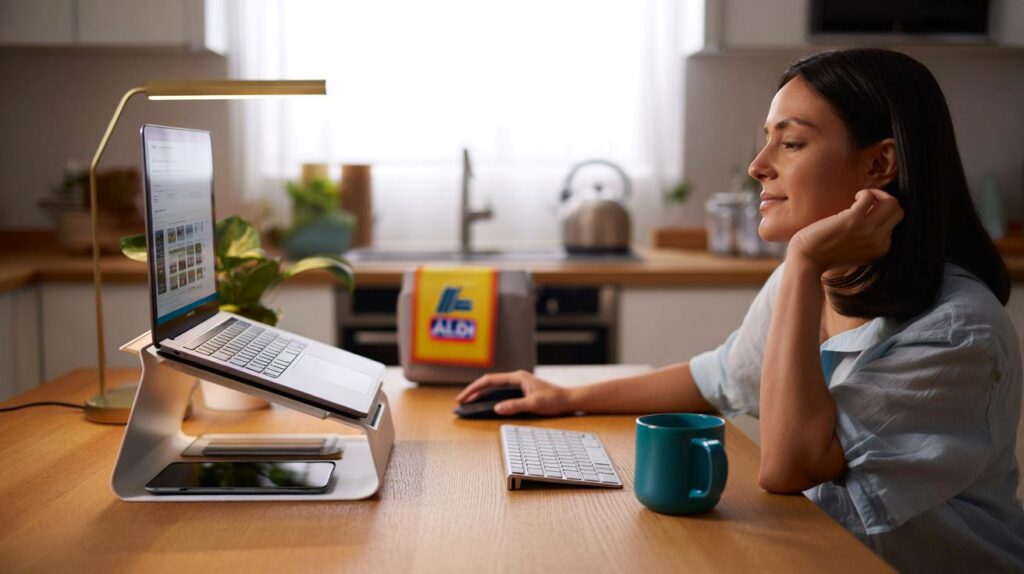
Kitchen tables and spare rooms strain under laptops and deadlines, yet a tiny tweak could reset your shoulders and your space.
Britain’s home workers keep stretching for a fix that doesn’t torch the budget. Aldi’s £12.99 SOHL laptop riser steps into that gap with a simple promise: lift the screen, clear the clutter, and make long days feel lighter.
What the £12.99 stand actually does
The riser lifts your laptop towards eye level, which reduces neck flexion and shoulder hunching. The open space beneath the platform stores a keyboard, mouse, tablet, notepad, or cables. That small clearance turns a messy desk into a tidy surface. It comes in black or white, so it blends with a kitchen table, a bedroom corner, or a dedicated office.
At £12.99, the SOHL laptop riser tackles three daily pain points at once: screen height, desk clutter, and visual stress.
Many people slide a keyboard and mouse underneath when they break for lunch. Others keep a notebook and charging hub there. The platform also creates airflow around the laptop, which helps during video calls or heavy tabs.
Small hardware, big posture gains
A laptop on a flat desk forces your neck to tilt forward. Raising the screen lets your eyes meet the top third of the display. Your neck stays closer to neutral. Shoulders drop. Your back works less.
- Eye line: aim for the top of the screen to sit around eye height.
- Arms: keep elbows near 90 degrees by using an external keyboard and mouse.
- Seat: set knees level with hips and plant both feet on the floor or a footrest.
- Breaks: follow the 20-20-20 habit – every 20 minutes, look 20 feet away for 20 seconds.
Who it helps
Anyone who switches between roles at the same desk gains here. Parents managing homework and Teams meetings. Students revising at the dining table. Freelancers hot‑desking at home. The fixed platform keeps your laptop stable, so you can type steadily and read docs without craning forward.
Remote workers who bounce between spreadsheets and calls often report late‑day neck ache. A small lift reduces the amount you bend your neck over hours, which matters by Wednesday afternoon.
How it compares to pricier rivals
High‑street stands often start around £20 and climb to £40 or more, especially for fully adjustable aluminium models. Those bring multi‑angle hinges and travel‑friendly folding. The Aldi riser keeps things simple: fixed height, solid platform, and a straightforward footprint. For a home desk that doesn’t move, the trade‑off makes sense.
| Option | Typical price | Height/angle | Portability | Best for |
|---|---|---|---|---|
| Aldi SOHL laptop riser | £12.99 | Fixed height | Stays on the desk | WFH setups, tidy storage under platform |
| Adjustable metal stand | ~£29.99 | Multi‑angle, variable height | Folds flat | Frequent adjusters, mixed seating |
| Gas‑spring monitor arm | £59.99+ | Fully adjustable | Fixed to desk | Permanent offices, multi‑screen rigs |
Any compromises to expect
You can’t fine‑tune height on a fixed platform, so you rely on chair adjustments or seat cushions to dial in fit. Very large 16‑inch laptops may hang slightly over the edges of some compact risers; check the footprint before you buy. If your laptop runs hot under load, keep vents clear and avoid blocking intake with thick pads.
If your neck hurts by 3pm, a £13 riser plus a low‑cost keyboard can change how your week feels.
Set‑up tricks that make it work harder
Test the height before you commit. Stack a few hardback books under your laptop to find a sweet spot. If your eyes sit level with the top of the screen when you sit tall, you’ve got it right. Then move to the riser.
- Pair with an external keyboard and mouse to keep wrists neutral.
- Use cable ties or a small tray under the platform to trap chargers and dongles.
- Nudge the screen back slightly to reduce glare from ceiling lights.
- Switch between sitting and standing if you own a converter; the riser works in both modes.
- Keep a microfibre cloth nearby; a smudge‑free screen reduces squinting and frowns.
Real‑world wins people notice
After a day, many users feel less urge to lean into the screen. After a week, shoulders loosen faster after work. The desk looks calmer because tools live under the platform. That calm matters when your workspace doubles as a family table by 6pm.
Students get a cheap upgrade that supports revision marathons without the usual neck kink. Creatives appreciate the extra space for a sketch pad under the stand. Hybrid workers like the easy routine: slide keyboard in, close the lid, and the room resets in seconds.
Buying notes you should check
Measure your laptop width and depth and compare them with the platform size in store. Look for non‑slip feet on top and bottom. If you use a separate monitor, ensure the laptop screen lines up horizontally to avoid twisting. If you wear varifocals, you may prefer the screen slightly lower to keep your chin neutral.
Colour choice matters for mood. Black hides scuffs and wires. White brightens darker corners. Either way, the plain finish blends into most rooms, which keeps the focus on work, not gear.
The bigger picture: small ergonomic wins add up
Neck and upper‑back aches often come from repetition: hours of tiny forward tilts that stack up. A steady platform breaks that cycle. Reduced visual noise also helps focus. When the desk has a clear home for tools, you spend less time rummaging and more time finishing tasks.
Think of the riser as part of a low‑cost bundle. Add a basic keyboard for £10‑£15 and a mouse for another tenner. You now have a modular setup that behaves like a desktop without the price of a full docking station.
Extra pointers that save you grief
- Neutral neck: keep ears over shoulders, not in front of them. If you feel your chin jutting, raise the screen or bring the chair closer.
- Lighting: aim a warm lamp across the desk, not straight at your eyes. Good light reduces the urge to lean closer.
- Break cadence: set a soft timer for micro‑moves. Stand, roll shoulders, and blink slowly to refresh the eyes.
- Heat management: if the laptop fans surge, lift the back edge slightly with a slim wedge to increase airflow.
- Shared spaces: label a tray beneath the riser for each family member so homework, chargers, and pens have a parking spot.
The Aldi SOHL laptop riser won’t replace a professional ergonomic assessment, yet it gives most people a head start. You get a higher screen, a tidier desk, and fewer reasons to shrug your shoulders to your ears by mid‑afternoon. Pair it with a sensible chair height, keep your wrists straight, and you’ll feel the difference by the end of the week.
If you want to go further, try a simple posture test. Sit tall, breathe out, and note where your eyes land on the screen. If you look at the top edge without tipping your chin, the height sits close to ideal. If not, tweak the chair or add a thin pad under the riser. Small nudges beat grand gestures when you work from home day after day.



Bought it yesterday from Aldi—didn’t expect much, but my desk actually looks calmer and the screen finally meets my eyes. For £12.99, this is a no-brainer. Pairing with a cheap keyboard made all the difference.
Does this handle a 16-inch MacBook Pro without wobble? Fixed height sounds limiting—whats the exact platform dimensions?