
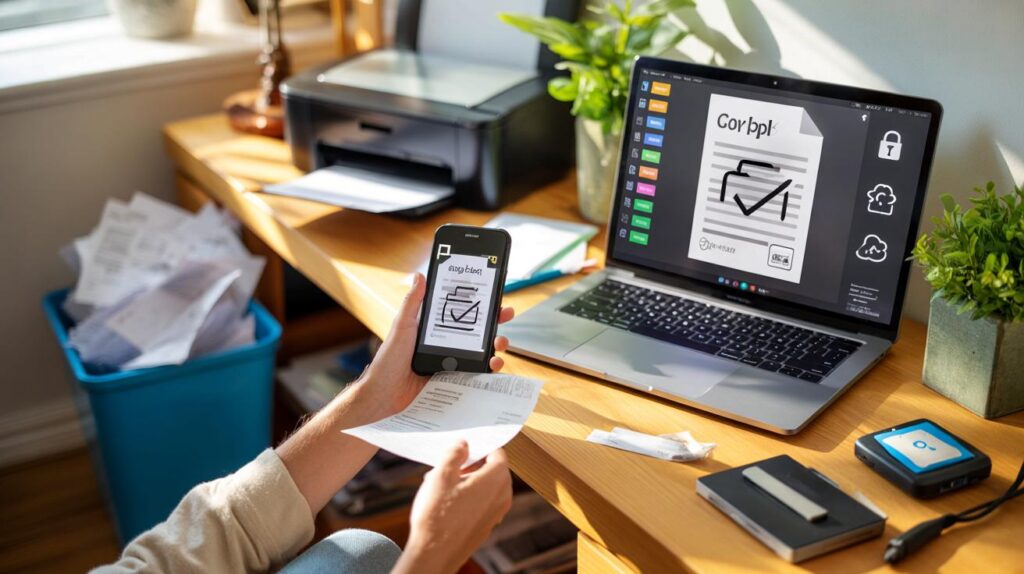
Your desk isn’t drowning because you love paper. It’s drowning because life throws receipts, forms, policies, printouts and “just in case” notes at you like confetti after a long wedding. Going paperless isn’t about becoming a robot. It’s about finding a calmer way to live and work.
I was standing by the office printer at 5:42pm, waiting for a contract I’d already emailed, while the cleaning crew wheeled past. A colleague rifled through a lever-arch file like a DJ searching for a record that doesn’t exist. The kettle clicked. Someone had left a taxi receipt on the tray with a coffee ring through the total. I thought of the drawer at home with NHS letters, a lost MOT slip, and the school trip form I was meant to sign yesterday.
There’s a better way, I kept thinking, not as a tech slogan but as a tiny domestic wish. Less shuffling, less “Where did I put that?”. A life where a document is wherever you are, not wherever you were when you printed it.
And then I watched someone scan a crumpled form with their phone in three seconds flat. It felt like a magic trick.
From piles to pixels
Paper multiplies when you’re not looking. Post lands, meetings spawn printouts, and the “one day I’ll file this” stack turns into a skyline. We adapt with sticky notes and ring binders until the system becomes the problem. Going paperless starts in the moment you decide to stop feeding the pile. Not next Monday. The next piece of paper you touch.
A small business owner I know, Liv, used to keep a shoebox of expenses under her desk. Receipts faded, some went missing, tax season felt like archaeology. One January she started snapping every receipt the second it hit her hand, using Microsoft Lens. The app read the text, filed it to a “Receipts YYYY” folder on OneDrive, and tagged the supplier. It looked small. Six months later she cut her bookkeeping time by half. That shoebox is now full of plant cuttings.
What changed wasn’t just storage. It was retrieval. Search beats storage nine times out of ten. If a document is OCR’d, named sanely, and sitting in a cloud drive, you can find it faster than you can swivel your chair. Paper only feels safe because it’s visible. Digital feels safer when you’ve set simple rules: capture fast, name once, search forever.
Tools and tactics that actually stick
Start with a two-minute capture habit. The moment a document enters your life, scan it with Adobe Scan or Microsoft Lens, then name it “YYYY-MM-DD — Topic — Source”. Save straight to a single inbox folder in Google Drive, iCloud Drive or OneDrive. Later, drag it to a home of its own. If you can’t name it in ten seconds, create a holding tag like “Action” and move on. The speed matters.
People stumble when they build an intricate folder maze on day one. Don’t. Begin with five buckets: Finance, Home, Work, Health, Records. Add tags for crosscuts like “insurance”, “MOT”, “kids”. Avoid file names like “final_v7_REALfinal.pdf”. Write “2025-01-17 — Car insurance — Renewal”. Let’s be honest: nobody actually does that every day from the start. Aim for 80% neatness and a weekly tidy, not perfection.
We’ve all had that moment when a form is due and the printer is out of ink. E-signature tools end that panic.
“The easiest paper to handle is the one you never print,” says Rosie Allen, an operations lead who moved a 70-person team to digital signatures in a week.
Pick DocuSign, HelloSign or Adobe Acrobat Sign and turn every “please print and sign” into a tap. And here’s a quick crib to keep close:
- Two-minute capture habit — scan on arrival, not later.
- Search beats storage — rely on OCR and simple names.
- 3-2-1 backup — three copies, two media, one off-site.
The human side of going paperless
Paper feels comforting. It crinkles, stacks, sits in a tray and looks like progress. Digital feels invisible until it’s not. That’s why the shift is less about apps than small rituals. Choose a “scan spot” at home, put a tray there, and make it part of your walk from the letterbox. Keep your scanning app on the first home screen. Mark Friday 4pm as your five-minute file shuffle. *Ritual beats willpower every time.*
Stories help. A parent told me they digitised school letters the moment they arrived, then created a shared “Family Admin” folder with a calendar link to due dates. No nagging, fewer surprises. A charity worker replaced printed meeting packs with a shared Google Drive folder and PDF Expert for markup. Their meetings got shorter not because people talked less, but because they found things faster. That’s the subtle win you feel in your shoulders.
Security is the quiet worry. Use device passcodes, enable two-factor authentication, and pick cloud platforms with encryption at rest and in transit. Keep a privacy-first mindset: don’t dump passports in public folders; share read-only links that expire. The 3-2-1 rule keeps you sleeping at night. One main cloud copy, one local copy, one encrypted backup on something like Backblaze or an external drive tucked away. The goal isn’t zero risk. It’s sensible resilience.
Why less paper changes more than your desk
The obvious win is waste. Fewer print runs, fewer reams, fewer doomed binders. What’s less visible is the cognitive space you get back. Paper creates breaking points in a day: the shuffle, the rummage, the sprint to the printer. A digital flow removes friction from chores you never meant to keep. It also gives your team, or your family, a common ground. One source of truth. One place to look.
This shift opens doors. Search your history of decisions in seconds. Hand off tasks without handing over a folder. Make room on your shelves for something alive instead of another stack of paper. The tools are ready, but the trick is human: tiny habits, not big speeches. Start with the next document you touch. The first scan is the moment your future self starts sending thank-you notes.
| Key points | Details | Interest for reader |
|---|---|---|
| Capture at the door | Scan on arrival, smart file names, single inbox folder | Instant control and fewer lost documents |
| Search over storage | OCR, simple tags, lean folder structure | Find anything fast without filing anxiety |
| Resilience by design | 2FA, permissions, and the 3-2-1 backup rule | Peace of mind without technical overload |
FAQ :
- What’s the quickest way to start going paperless?Pick one scanning app, one cloud folder, and a naming rule. Begin with today’s papers, not the old stack. The backlog can wait for a rainy Sunday.
- Do I need a dedicated scanner, or is a phone enough?A phone with Adobe Scan or Microsoft Lens is enough for most people. If you process dozens a day, a desktop scanner with auto-feed speeds things up.
- How do I handle signatures without printing?Use an e-sign tool like DocuSign, HelloSign, or Adobe Acrobat Sign. For informal docs, many PDF apps let you draw a signature once and reuse it.
- Is cloud storage safe for sensitive documents?Choose reputable providers, enable two-factor authentication, and share with permissions, not attachments. For passports or IDs, add an encrypted archive as an extra layer.
- What about legal or tax documents I must keep on paper?Keep the originals where required, but still scan them. The digital copy helps daily life, and the physical stays secure for the official bit.



Loved the ‘two-minute capture habit’ — I started today and already snapped three receipts with Lens. The naming convention feels nerdy but works. Search really does beat storage; I found my MOT renewal in seconds. This post might finally retire my binder tower.
Good read, but I’m wary about cloud lock‑in and long‑term access. What happens if OneDrive changes terms or OCR breaks? Also, encryption at rest doesn’t equal end‑to‑end; any tips for zero‑knowledge options? I’d appriciate a section on exporting and open formats (PDF/A, CSV).