
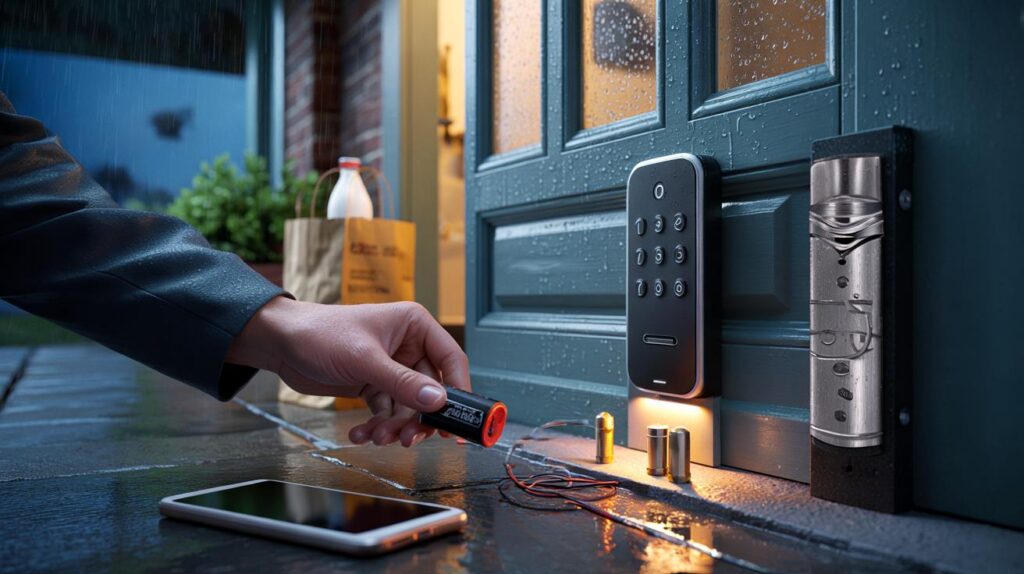
You can leave your keys on the kitchen table now. A smart lock promises to notice you arriving, open with a tap, and keep bad actors out with modern encryption. The question nagging at the back of your mind is the old one: is your front door really safer when you add Bluetooth and a battery—and what happens when that battery dies or the power goes out?
I met the future of front doors on a wet Tuesday in Leeds. Groceries digging into my fingers, sleeves stuck to my wrists, I nudged the handle with a knuckle and heard the motor whirr. The bolt retracted with a neat little sigh. A simple, almost smug sound.
Then, a week later, my phone died on the train. I got home after dark, tried the code I’d set and promptly forgotten, and stared at the quiet keypad like it could read my face. The lock didn’t care that I was cold or that the milk in my bag was warming by the minute. The house looked back at me with a blank, digital expression. Somewhere inside, a battery was wondering how long it had left. That’s when the real testing begins.
And what happens next might surprise you.
How safe are smart locks when a stranger actually tries your door?
Walk down any British street and you’ll see a new mix on old doors: a brass letterbox, a sturdy euro cylinder, and a small black slab where a keyhole used to be. This is where the maths of safety meets the mess of real life. A smart lock is two things at once—hardware and software—and both need to pull their weight. The metal resists kicks and drills. The app resists phishing and old passwords. Get either piece wrong and the door becomes a story people tell in the pub.
A neighbour of mine swapped his ageing cylinder for a smart retrofit that turns the key from inside. He kept the original outside hardware—just a knocker and a normal-looking keyway. Two weeks later, someone tried the handle at 3 a.m. The lock didn’t budge, the log noted a failed attempt, and he slept through the whole thing. In independent tests, high-grade deadbolts and reinforced strike plates still beat brute force, and that part hasn’t changed. What smart adds is awareness: attempts get logged, alerts ping your phone, and you can see if the door was left on the latch. When it works, it’s strangely calming.
Most real-world attacks don’t look like films. They’re quick tries: a snap at a cheap euro cylinder, a kick near the latch, a twist with a bump key, or a door that didn’t quite catch. Digital attacks are quiet too: guessing weak PINs, trying default admin passwords on bridges, reusing leaked credentials. So safety is a funnel. At the top is physical spec: look for a quality lock case, reinforced strike, and a cylinder with anti-snap/anti-drill ratings. Then comes comms: strong encryption, no universal default PINs, optional two-factor sign-in for the app. At the bottom is behaviour. A lock can be clever. It can’t redeem a bad habit.
What happens when the battery dies—or the power cuts?
The good news: most residential smart locks are battery powered. They don’t care about a mains cut. If your street goes dark, the lock stays locked and opens as normal for you. When the lock’s own batteries run low, decent models chirp, flash, and nag you in the app well before they quit. If you ignore the hints, you still have lifelines. Many keypads have two little metal contacts—touch a 9V battery to them and the lock wakes long enough to accept your code. Some models take a quick boost via USB-C. Others hide a physical keyway behind a neat cap. Pick one backup method, learn it once, and stash what you need where you can reach it.
There are edge cases. Electric strikes and maglocks on commercial doors behave differently during power cuts—some fail safe (unlock), some fail secure (stay locked). That’s not most homes. In a terrace or semi with a standard multipoint door, the smart bit usually turns the same mechanical gear you’ve used for years. If the motor ever jams or the app misbehaves, that inside thumb-turn is still king. One small, boring tip that saves headaches: keep the door aligned. A sagging hinge makes any lock work harder and drains batteries faster. Let’s be honest: nobody checks hinge screws and weather seals every week. But a five-minute tweak can double battery life.
On the day your lock actually dies, it won’t feel cinematic. It’ll be a school run, a soggy dog, and a beep you meant to sort forgotten again. That’s where muscle memory wins. Practice the backup once—touch the 9V, use the key, try the code—so when your hands are full you don’t overthink it. And yes, talk about the plan at home. Teenagers and guests rarely read manuals. Keep a note in your phone of the battery type and a spare in the drawer near the door. That small ritual saves a lot of swearing when rain finds your collar.
“A smart lock should add layers, not remove them. Physical key, PIN, phone—pick two that work for your life and make them boringly reliable.”
- Quick crisis checklist: phone dead? Try the code. Code forgotten? Touch a 9V to the keypad. No 9V? Use the hidden keyway. Totally stuck? Turn from inside and recharge batteries before relocking.
- Keep one spare 9V in the car glovebox or in the parcel box outside.
- Name a trusted neighbour as a temporary code holder during holidays.
- Log a calendar reminder to change batteries with the clocks in spring and autumn.
Choosing and living with a safer smart lock
Your door is the boundary between personal chaos and public order, so pick gear that respects both. Start with the door, not the app. If you have a uPVC or composite door with a multipoint mechanism, choose a smart solution designed for that gearbox, not a bodge. If you have a timber door with a separate deadbolt, a retrofit that turns the inside thumb-turn can keep your external look normal. Next, pick a brand that publishes its security model: end‑to‑end encryption, no default codes, and a clear policy for vulnerability patching. Look for independent marks where relevant—Sold Secure, Secured by Design, or a cylinder rated to resist snapping. **Physical security first.**
Then decide how you’ll unlock most days. Phone in pocket with Bluetooth presence? Great, but also set a PIN you can remember under stress. Want phone‑free entry for kids or a dog walker? A keypad with per‑user codes and time windows is a gift. Fancy NFC with a watch? Lovely, just remember smartwatches run out of battery too. For privacy, prefer locks that work locally without needing a cloud account; a bridge should be optional, not mandatory. If you add remote control, gate it with app passcodes or biometrics and switch on two‑factor for your account. **Privacy isn’t automatic.**
Maintenance is a rhythm, not a chore. Swap batteries with quality cells at the same time you bleed the radiators or change the smoke alarm. Lubricate the latch and bolts with a dry lock spray once or twice a year. If your lock learns your door’s throw, let it recalibrate after weather shifts or when you tweak hinge screws. Set sensible auto-lock timers that fit real life—30 seconds is fine if your hallway isn’t a baggage claim. And keep firmware up to date, but don’t smash “Update” five minutes before school. *On the days you’re knackered, simple wins.* **Backup entry options matter.**
We’ve all had that moment where the door feels like a stage and you can’t remember your lines. That’s why the little choices matter. Pick hardware that still works when your phone dies. Choose habits that fit the way your family actually moves through a Tuesday. Share the backup plan with the people who need it, then forget about it until life throws rain and a dead battery at your doorstep. Technology should fade away into the timber and the paint, letting you get on with carrying milk and making tea. Safety feels less like a gadget then, and more like a house that knows you.
| Key points | Details | Interest for reader |
|---|---|---|
| Smart locks are as strong as their hardware and setup | Look for quality deadbolts, anti-snap cylinders, encrypted comms, and sane defaults | Cut through marketing and choose what actually resists common attacks |
| Battery and power failures are survivable | 9V jump pads, hidden keyways, USB-C boosts, and local battery power keep doors usable | Know your backup so a dead phone or blackout isn’t a crisis |
| Everyday habits beat fancy features | Door alignment, battery rotation, per-user codes, and minimal cloud reliance | Simple routines that raise security without making home life awkward |
FAQ :
- Can a burglar hack my smart lock from the street?It’s rare when you pick a reputable brand, use strong app credentials, and disable default codes. Most break‑ins still target weak doors and cylinders, not cryptography.
- What if my lock’s batteries die completely?You’ll use the backup: a 9V jump on the keypad, a concealed keyway, or a quick external power boost, depending on the model. Check your manual once and practise.
- Does a power cut unlock my door?Home smart locks are usually battery powered, so they stay locked and work normally. Wired commercial systems behave differently and may fail safe or fail secure.
- Is a keypad less safe than a phone?It’s different. A well‑managed keypad with unique, time‑limited codes can be very safe and practical. Don’t reuse obvious PINs, and rotate access for guests.
- Will auto‑lock trap me outside?Set a delay that fits your routine and keep a backup method handy. Many locks won’t auto‑lock if the door is ajar, and you can disable the feature when hosting.



Thanks for the practical backup plan—touching a 9V to wake the keypad was new to me. The Leeds rain scene sold it; feels honest. This defintely makes me reconsider upgrading. One tidy tip I’ll steal: align the door to save battery. Love the “pick two methods” mantra. Cheers! 🙂
Quick question: doesn’t exposing 9V jump pads create a new attack path? If someone brings a battery, they can at least power the keypad—does that increase brute‑force risk, or are lockouts and rate‑limiting strong enough in real models?