
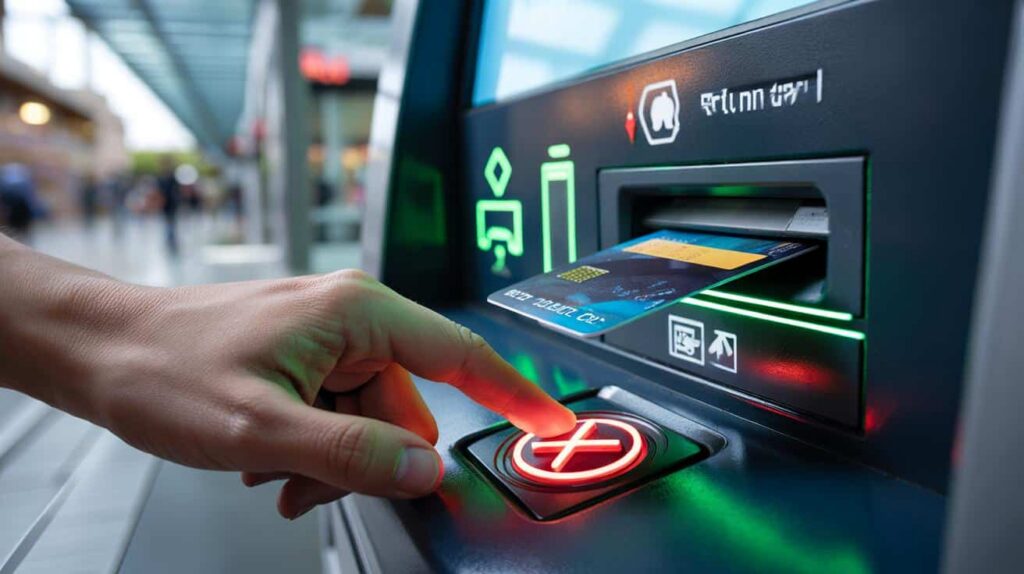
The screen freezes. Your card stays inside.
Stress spikes in that moment. People watch. The machine hums. You need a calm script that works in real life, not vague advice. Here’s a clear method that gets your card back fast and keeps your money safe if it doesn’t.
When an ATM keeps your card
Most modern ATMs include built‑in ways to end a stuck session. They exist for human error and for glitches that lock the slot. You can often trigger a clean reset that releases the card without help from staff.
Look for the red X “close” control. On many ATMs, holding this button for 3 to 5 seconds ends the session and prompts the machine to eject your card.
Touchscreens show similar controls. Close all on‑screen operations, cancel the transaction, and confirm. Newer machines even add a dedicated “return card” button. The label changes by bank, but the symbol often shows a card icon with an arrow.
Quick steps to try on the spot
- Press and hold the red X or Cancel button for a few seconds to force a session close.
- If the screen is touch‑enabled, tap Cancel, then End, then Confirm to close everything.
- Check for a “return card” button and press it once, then wait 10–20 seconds.
- Stay at the machine. Keep the slot clear. Do not accept help from strangers.
- If the card ejects, take it first. Only then review the screen for receipts or cash.
Never walk away before the machine confirms the session is closed and the card is in your hand.
These controls exist because real‑world use gets messy. People grab cash and forget the card. Machines misread chips after rain or dust. A forced session close tells the ATM to tidy up, which usually includes a card release.
If the card still won’t come out
Act fast to cut fraud risk. A genuine fault can happen. A setup by criminals can happen too. Both cases call for the same next moves.
Call the right number fast
Use the emergency number on the back of your card or the 24/7 line listed on the ATM fascia. Ask to block the card immediately. Say the card is “retained by ATM.” Note the time and the ATM location.
Block first. Ask questions after. A blocked card stops withdrawals and contactless payments in minutes.
What to record on the spot
- ATM ID number or branch address shown on the machine.
- Time, attempted action (withdrawal, balance check), and any error message.
- Visible damage: loose card slot, odd overlays, tape, or extra camera bumps.
If the machine sits inside a branch during business hours, alert staff. Many branches keep a log and can open the safe later, then hand the retained card back against ID. If it’s a third‑party ATM, your bank still blocks and replaces the card as standard procedure.
Dispute and monitoring
Watch your accounts over the next hours. Switch on instant alerts in your banking app if available. Report any unknown transactions at once. Most banks apply zero‑liability policies when you report quickly. In many regions, strong customer authentication rules limit fraud exposure after a block request.
| What likely happened | What it means | What to do |
|---|---|---|
| Timeout after cash dispense | The card stayed in the slot too long and the ATM captured it | Call the bank, block, ask if branch can retrieve later with ID |
| Software freeze | The session hung and the card mechanism locked | Force close with red X; if no release, block and file incident |
| “Lebanese loop” trap | A insert device holds the card for thieves nearby | Do not leave. Call bank. Inform security or police. Stay until help arrives |
| Skimmer + pin capture | Illegal reader and hidden camera stole data and PIN | Block immediately. Dispute any transactions. Request new card and PIN |
A growing workaround: contactless or cardless cash
ATMs now add contactless cash withdrawal. You tap your card or phone on the NFC reader and enter your PIN. No insertion. No risk of a swallowed card. Some networks let you pre‑stage a withdrawal in the app and scan a QR code on the ATM. It shortens time at the machine and sidesteps damaged slots.
Where it already works
Large bank networks roll this out at busy branches and transport hubs. Independent ATM operators upgrade slowly. Look for the contactless symbol near the screen or pin pad. Your bank app often lists enabled machines in the locator.
Limits you should know
- Cash limits may be lower for contactless or cardless than for chip‑insert withdrawals.
- Some ATMs accept phone wallets but not physical card taps, or the opposite.
- Foreign cards may fail on older firmware, even if the logo appears on the fascia.
When you can tap to withdraw, you remove the single biggest cause of card capture: the slot itself.
How to spot a risky ATM before you use it
Quick checks prevent drama. A 10‑second scan can flag tampering and save your card and PIN.
- Wiggle the card slot: it should feel solid, with no flex or gaps.
- Cover the keypad with your hand: cameras love exposed PINs.
- Look for overlays: raised bezels, mismatched colors, sticky residue, or loose trims.
- Prefer indoor machines at bank branches with cameras and guards.
- Avoid help from strangers. Staff use badges and do not ask for your PIN.
Never enter your PIN while on a call with anyone claiming to be “from the bank” at the machine.
Extra help that actually reduces risk
Pre‑set locks and limits
Use your bank app’s card controls. Lock the card when you travel through busy hubs. Set low cash limits on daily withdrawals. Enable instant spend alerts. These tools cut the window for fraud and calm the panic if a card goes missing.
What to expect after a retained card
Banks usually replace the card within a few days. Branches may return a card retained on their own ATM if you present ID and the machine logs match. Third‑party ATMs often destroy retained cards by policy. Ask your bank to block first and ship a new one. Request fee refunds if a failed cash attempt generated charges.
A simple script to keep handy
- Hold red X or Cancel for 3–5 seconds. Try the on‑screen End or Return Card controls.
- If no release: call the emergency number, block the card, note time and ATM ID.
- Stay near the machine until you speak with the bank. Photograph the screen if safe.
- Turn on alerts, check transactions, and file a claim for anything you do not recognize.


