
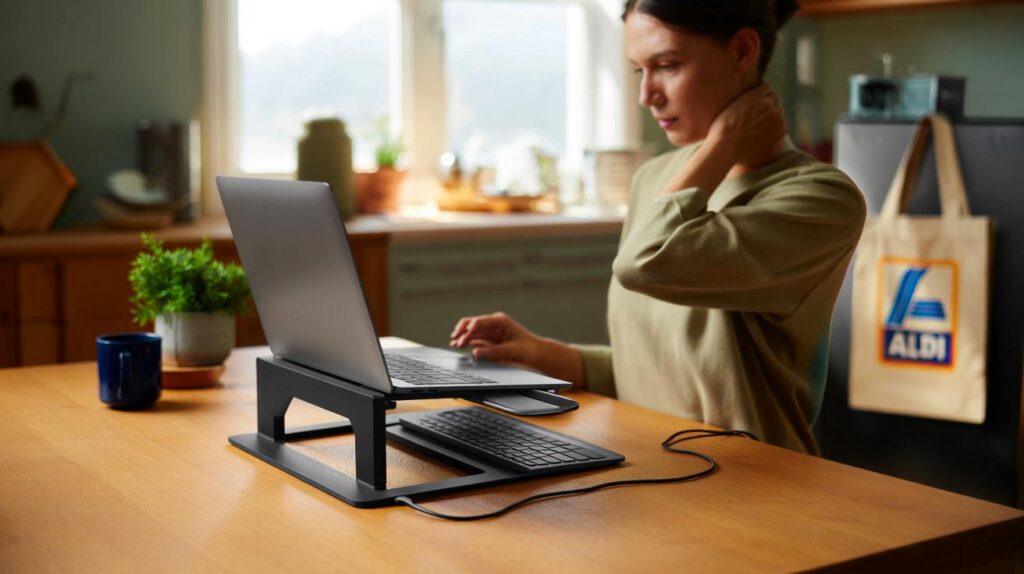
Creaking shoulders, cluttered desks and endless video calls. A tiny change to your setup could shift the mood, the mess, and the aches.
If your kitchen table moonlights as an office, you’re not alone. Aldi’s SOHL Furniture Laptop Riser, priced at just £12.99, lands as a low-cost tweak that nudges your screen to a healthier height and clears space under it for the kit you keep losing under papers.
What you’re getting for £12.99
The SOHL Furniture Laptop Riser raises your screen closer to eye level. That simple lift can ease the urge to hunch, which often leaves necks sore and shoulders tight. The platform also creates a useful shelf underneath for a keyboard, tablet, notebook or charger. It comes in two finishes, black or white, so it blends into most rooms without shouting for attention.
Raise the screen, reclaim the space, and reduce the neck craning that creeps in during long days at the laptop.
The appeal sits in its simplicity. No software. No screws. No learning curve. You pop the laptop on, slide your peripherals beneath, and start typing. For parents squeezing in emails between school runs, or anyone sharing a desk at home, that matters.
Why this £12.99 stand has people talking
Eye-level viewing without a faff
Laptops pull your gaze down. That drags your head forward and strains the neck. Shift the screen higher and you tend to sit taller. You don’t need exotic mechanics to feel that difference. A fixed-height platform often does enough for most body shapes.
Less clutter, calmer head
When the keyboard slides under the stand, the surface clears in seconds. That visual reset helps you focus faster. It also makes it easier to switch the table back for dinner without corralling cables and pens into yet another drawer.
One stand, two wins: a tidier desk and a viewing angle that feels kinder after hour three of spreadsheets.
How it stacks up on price
Work-from-home accessories have crept up in cost. Many basic metal stands start around £20, and adjustable ergonomic models can push to £90. Aldi’s £12.99 price undercuts the lower end and widens access for people who want comfort on a slim budget.
| Option | Typical UK price | What you get |
|---|---|---|
| Aldi SOHL laptop riser | £12.99 | Fixed-height platform, black or white, storage underneath |
| Generic metal stand | £20–£35 | Fixed or folding design, often ventilated |
| Adjustable ergonomic stand | £40–£90 | Height and tilt adjustment, premium materials |
If you’re switching from a £20 entry-level stand to Aldi’s £12.99 model, the saving starts at £7 and can be higher against pricier alternatives.
Who this is for
- People working at a dining table who can’t leave a full office setup in place.
- Parents juggling laptops, tablets and homework on shared surfaces.
- Students in small rooms needing vertical storage and a cleaner visual field.
- Anyone feeling neck or shoulder tightness after long screen sessions.
How to get the ergonomic benefit
Set the screen height
Aim for the top of the display to sit roughly at eye level when you look straight ahead. If you wear progressives or bifocals, you may prefer a slightly lower screen to avoid craning your neck.
Add a keyboard and mouse
With the laptop raised, your hands sit more comfortably if you use an external keyboard and mouse. Rest forearms near level with the desk and keep wrists neutral.
Mind your chair and feet
Plant feet flat on the floor or on a footrest. Adjust your chair so knees bend around ninety degrees and shoulders relax. Short movement breaks keep blood flowing and help concentration.
Small, consistent changes beat a single heroic purchase. Raise the screen, move often, and keep wrists neutral.
Design notes that help at home
The minimalist shape blends into living spaces. Black hides scuffs near a busy kitchen, while white disappears on lighter furniture. The open bay under the platform swallows a full-size keyboard and a notepad, which means fewer dust-trap piles and fewer cables snaking across the surface.
For households where homework and work share the same table, that stash space reduces friction. When the bell rings or dinner looms, the screen slides back, the keyboard tucks away, and the table looks ready for its next job.
Practical checks before you buy
Measure your desk depth to ensure there’s room for both the riser and your external keyboard. Check your laptop’s underside vents; most platforms leave plenty of airflow, but keep vents unobstructed and avoid covering them with papers or cloth. If your laptop is especially large or heavy, verify the platform feels stable on your surface and doesn’t wobble under typing pressure.
Keep vents clear, keep cables tidy, and keep the platform centred on a stable surface for a better daily rhythm.
Where it sits among your options
This £12.99 model suits people who want an immediate uplift in posture cues and a tidier desk, without fiddly adjustments. If you need frequent height changes or share the desk with someone much taller or shorter, an adjustable stand might serve you better, though it costs more. For many homes, especially those short on space, a fixed riser hits the sweet spot between comfort, order and cost.
Extra ways to squeeze value from a £12.99 stand
Pair it with routine tweaks
Set hourly timers for short stretch breaks. Use the under-platform bay as a “reset zone” where your keyboard, notebook and pen return after each session. That habit stops clutter from rebuilding and speeds your next start.
Use it beyond work
Park the laptop higher for family video calls so faces sit at a more flattering angle. Slip a tablet under the platform for charging. Prop printed revision notes on the platform while the screen holds reference material. Small organisation wins stack up across the week.
What to watch for with fixed-height stands
Fixed stands don’t suit every body shape or chair height. If your shoulders creep up, lower the chair or adjust the screen angle. If you work across multiple locations, consider a folding stand for travel and this platform for home. Keep a soft cloth to wipe the surface; dust and crumbs accumulate faster on worktops that double as dining tables.



Just grabbed one at £12.99—my dining table finally looks less chaotic. Thanks for the clear tips on screen height!
Fixed-height makes me nervous—anyone 6’2” tried it? Does it still line up near eye level or am I better off with adjustable?